Words Matter

Advice on Communicating (Learned the Hard Way)

Do you overpraise? — 07/03/2011

Do you overpraise?

“You rock!” “You’re a rockstar!” “You are awesome!!”

If you use phrases like these for a colleague who just saved your organization, fixed a major problem or landed a huge, company-making account, that’s great.

But if you send messages like these anytime a co-worker emails you a file you asked for… then it’s overpraise.

Most people can sense sincerity — and insincerity. If your messages come across as overpraise, they will likely have the opposite effect you are looking for: Rather than ingratiating you to others, they will likely turn people off.

Watch out for overpraise in your messages. If someone sends you the information you asked for, or does you a simple favor at work, the correct response is not “You’re a rockstar!” It’s “Thank you.”

Productivity is great, but there comes a point… — 06/21/2011
How to Create Outstanding PowerPoint Presentations — 06/09/2011

How to Create Outstanding PowerPoint Presentations

1) Put less information on each slide

Silicon Valley investor Guy Kawasaki created the “10/20/30 Rule of PowerPoint.” This simple formula states your presentation should be no more than 10 slides, last no longer than 20 minutes, and have no text smaller than 30-point font.

The first two rules probably aren’t relevant to you. Kawasaki created this formula for entrepreneurs pitching him for venture funding. He chose 10 slides because he likes to see business ideas presented in a specific way. And he chose 20 minutes because he doesn’t want to sit in those meetings for two hours!

But the third rule – 30-point font minimum – is a useful guide for any presentation you create, for two reasons. First, it’s easier for an audience to read larger text onscreen. Second, forcing yourself to use large text is a clever way to make sure you’re placing only the most important words and phrases in your slides.

2) One idea per slide

Contrary to Kawasaki’s 10-slide rule, it’s okay to have many slides in your presentation – as long as each one is clear, advances your argument and communicates a single thought or idea. I’ve seen PowerPoint presentations that ran over 100 slides – but were powerful and even captivating.

The trick is to use each slide to tell its own little story – with visuals, if possible – and to keep the story moving quickly.

Don’t shove a bunch of different points and thoughts into each slide. That all-too-common formula – bullet, sub-bullet, sub-sub-bullet – will make your presentation come across cluttered and boring – and your audience will start wondering how to get out of the room without being noticed.

3) Just give us the headlines (and maybe some subheads)

PowerPoint is a presentation vehicle, but it is not the presentation itself. That means your slides should support and amplify your verbal presentation – but should not contain every word of your talk. Keep text on your slide short enough that your audience can absorb it in a second or two.

Think of each slide as a billboard. You have to communicate your idea (using words, imagery or both) immediately or your audience will drive right by. So just give them the headline – and maybe a key subhead.

Say you’re giving a presentation to summarize department spending in the previous quarter. If you want to make the point that year-over-year spending was down 14%, you could create a slide with an enormous “Spending down 14%!” across the center. Perhaps you’ll want an image of a happy face, a thumbs-up or a party hat alongside the message, to underscore the good news. But that’s it – one idea on the slide.

In your talk, you can break down specifically in what areas and dollar amounts your team saved over last year’s budget. But putting all those details on the slide will only weaken the visual impact of “Spending down 14%!”

Note: sometimes you will be asked to deliver information using PowerPoint, but without a live talk. If you’re asked to “send over a presentation” to describe the quarterly budget, as in the example above, you can include additional detail in the “Notes” section below each slide. You can also create “Appendix” slides at the end of the presentation, and reference them in your main slides. These techniques let you keep each slide clean and powerful.

4) Use imagery

Bestselling author Seth Godin argues that communication is the transfer of emotion. One of the great advantages of PowerPoint is that each slide gives you a blank canvas to tell your story. And as Godin points out, a single image can communicate more emotion than all the text you can squeeze into a slide.

If you’re using PowerPoint to convey the ecological dangers of pollution, you could list bullet after bullet of statistics about species harmed or the number of gallons of waste illegally dumped. Or you could show a dead bird covered in toxic sludge.

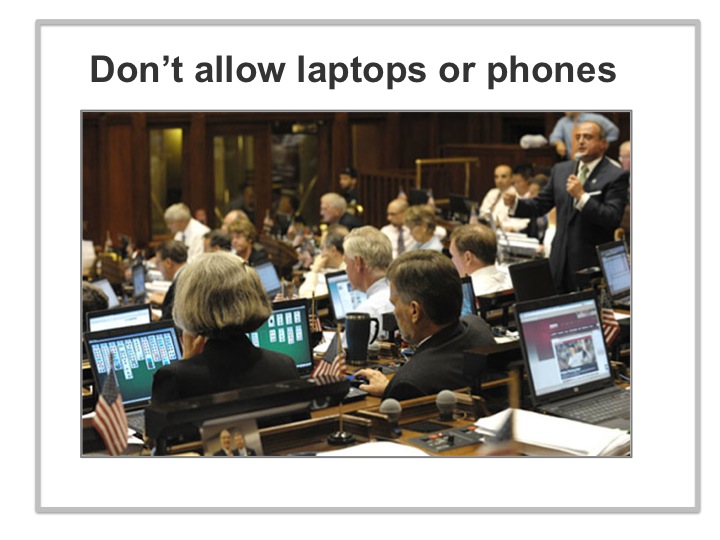
Here’s a slide I created for a seminar called Leading Effective Meetings. One of my guidelines for creating better meetings is not to allow computers or cell phones in the room. I could have listed data about distracted attendees and lost productivity due to computer use in meetings. Instead I made my point with this image – of the Connecticut State Legislature in session. An actual depiction of the problem, combined with some humor, made the case much more powerfully.

Note: use real imagery, such as photos from Corbis or iStockPhoto. They’re inexpensive (just a few dollars per image), excellent quality, and the sites make it easy to quickly find the type of image you’re looking for. Do not use clipart or other silly, cartoonish illustrations. Also, do not use any of the colorful design patterns PowerPoint offers as backgrounds. These elements look amateurish and undermine the seriousness and power of your presentation.

5) Ask yourself, Am I really creating a Word document?

Sometimes you will start creating a PowerPoint presentation and notice quickly that with each slide you feel compelled to list bullet after bullet (and sub-bullets and sub-sub-bullets) of data, and large blocks of text to explain those data.

If this happens, you might want to stop and ask yourself if you’re using the right tool. Perhaps you could more effectively communicate this information in an Excel spreadsheet or a Word document. Or perhaps you simply need to have a meeting to discuss the information you’re trying to cram into your slides.

That’s okay. You’re better off figuring this out now, and switching tools, than building a clunky, hard-to-read PowerPoint presentation that doesn’t allow you to present your content as clearly or persuasively as you’d like.

6) Don’t place your agency’s name and logo on every slide

This might seem like a nitpick complaint, but placing your logo on the bottom of every slide weakens your presentation in several ways. It physically consumes a good portion of each slide’s real estate, leaving you less room for the slide’s single idea. It also adds clutter, which lessens the visual impact and weakens the emotion of every message you try to communicate in your presentation.

And really, does your audience (or whomever you’re emailing your PowerPoint file) need to see the Department of Education logo 32 times in your 32-slide presentation?

The only place in your PowerPoint presentation for your agency’s logo is the title slide. Once you’ve moved on to slide two, assume everyone in the room knows what agency you represent – and get on with telling a great story!

So which is it? — 05/25/2011

So which is it?

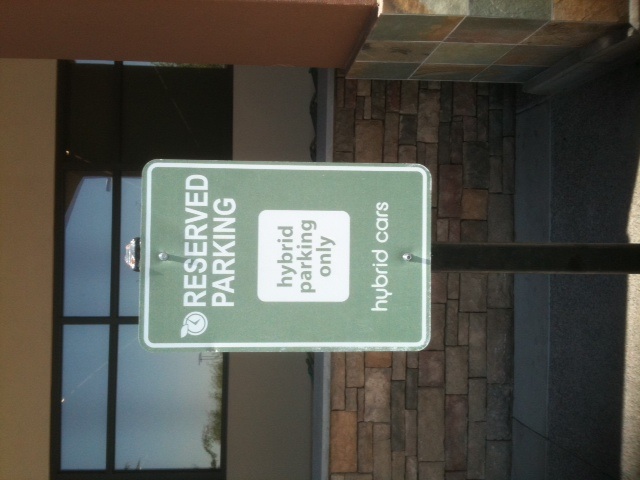
Signs like these really make you wonder about the green movement, don’t they? If you really are “saving the world” with your hybrid car, then shouldn’t that be reward enough?

Do they sell these cars on “saving the world,” or on “saving the world + special parking privileges”?

What to avoid when speaking to a group — 05/16/2011

What to avoid when speaking to a group

According to a Gallup poll, these are the things that people find most annoying about other people’s speaking habits. Commit them to memory, so you won’t make these mistakes when it’s your turn at the podium.

Cursing 84%
Mumbling, talking too softly 80%
Talking too loudly 73%
Monotonous or boring voice 73%
Filler words like “um,” “you know” and “uh” 69%
A nasal whine 67%
Talking too fast 66%
Poor grammar, mispronouncing words 63%
A high-pitched voice 61%
Little-Known Tricks to Make Your Reports Stand Out — 04/28/2011

Little-Known Tricks to Make Your Reports Stand Out

You know that feeling you get when a colleague or supervisor asks you to review a report they’ve written? If you’re like me, you usually develop a sudden urge to sharpen some pencils, or reload your stapler, or… do anything but read that report.

That’s because most reports we’re forced to read at work are flat-out boring. They’re dense, lifeless documents written as though their authors expect them to be dumped straight into a file cabinet forever and read by nobody. And often, these reports are so visually unappealing that this is exactly what happens to them.

What an opportunity for you!

If you’re asked to write a report – for your department, agency, task force, or whomever – use the opportunity to make a positive, lasting impression on your readers. You might be writing on a dry work-related topic, but your report can still be powerful, memorable and full of life.

Here are some tips for writing standout reports – tips proven to win over readers by the most successful copywriters in history.

Make your title an attention-getter

Direct-mail copywriters – the writers most knowledgeable about what works and doesn’t work with readers – have found that five times more people read headlines than the ads and articles themselves. Your report’s title is your best chance to catch your readers’ attention – and to make your case.

You intuitively know the value of a well-worded title, which is why you wouldn’t spend hours drafting the perfect email and then send it without a subject line.

So let’s say you’re asked to write a report on your agency’s attendance at a symposium last year – and to make a case for or against sending staff this year.

You could write the standard report headline, something like:

“Agency Attendance at Continuing Process Improvement Symposium – a Discussion of Value Derived from Last Year’s Attendance and Resource Allocation Suggestions for This Year’s Convention”

Feel like sharpening some pencils?

Why not write a title that’s powerful and pulls your readers in? Nobody ordered you to write a boring, lifeless headline. Try something like this:

“Three Reasons Our Agency Must Attend This Year’s CPI Symposium”

Include plenty of subheads

Another great technique, proven successful by the great advertising copywriters, is to sprinkle your report with bolded subheads.

These have the advantage of breaking up your text visually. It’s simply easier on your readers’ eyes if, as they skim or read through your report, they see a subhead in bold standing alone every few paragraphs.

Subheads also give you a second chance to tell your story. In fact, a well-written sequence of subheads throughout your report can tell an abbreviated version of your entire story. This means more people will grasp the highlights of your case – particularly the skimmers who read only your headline and subheads (more people than you might realize).

Using our symposium attendance example above, some of the subheads sprinkled throughout your report might look like this…

Staffers who attended last year’s Continuing Process Improvement Symposium reported an average 18% efficiency improvement, according to agency surveys after the show

(Your next couple of paragraphs will describe the details supporting this subhead.)

Total cost to send eight employees from across the agency would likely be recouped within one month, assuming comparable efficiency improvements agency-wide from last year’s show

(You’ll then write out the details supporting the claim in this subhead; you might also include a graph or chart to illustrate the point.)

Include images

Ad copywriters have also scientifically tested data on images in documents. Turns out, about five times more people will look at an image in an article or advertisement than will read the rest of the copy.

You know this intuitively as well. When scanning a document, our eye gravitates first to illustrations, photos, graphs or charts – anything visual.

Images give your reports some real advantages. First, they break up the text and make your report visually more inviting.  (Note: your bolded subheads have a similar effect – and the effect of using both subheads and images can be a tremendously powerful and effective report.)

Second, images help the visual learners among your readers. Some people can read page after page of explanation and still won’t comprehend or be persuaded by your points as clearly as they will after viewing a single chart.

There’s yet another value that images bring to your reports, which leads me to my next tip….

Include strategically written captions with your images

One reason to include images in your reports is that they present an opportunity to write powerful captions that help make your case.

Again, we learn from the legendary ad copywriters that about four times more people will read an image caption than will read the rest of the text of an article or ad.

This makes sense. We are drawn visually to an image in a document, and then we immediately look for some text to orient us – to tell us what the image means.  That leads us to the caption.

Using our symposium example once more, if you included a bar graph illustrating attendees’ self-reported efficiency improvements based on what they learned at the show, your caption under the graph would be a great opportunity to highlight how valuable the show will be again this year.

A graph caption in a typical report would read like this:

Above: agency attendees’ self-reported efficiency gains attributable to CPI Symposium, 2010.

Feel like reloading your stapler?

Instead, use the opportunity your graph’s caption offers – four times as many readers as the rest of your report – to make your case and grab your readers’ attention. Like this…

Our attendees at last year’s CPI Symposium learned such valuable work strategies that they report almost 20% more efficiency on the job today – a compelling case for investing in attendance at this year’s show.

Bottom line: include images in your reports specifically so you can write powerful captions under them.

So there you have it: headlines, subheads, images, and image captions. These elements of your report will be read many times more than the rest of your report. Few people realize the power of treating these elements as the mini-salespeople that they can be for the report itself. In fact, many of your colleagues probably don’t even include many of these elements in their reports.

But you can. And your reports will be much more powerful and memorable as a result.

The medium is the message — 04/21/2011
Watch your narratives — 04/08/2011

Watch your narratives

Here’s a brilliant insight I received from a judge years ago, when I served on a jury.

Moments before our trial got underway, the judge issued the jury this warning: As you hear this case, he said, make every effort not to write a narrative in your mind of “what happened.”

“He’s guilty,” “she’s really the victim here,” “these people are all crazy and neither side deserves any money” — these are all narratives, and they’re all detrimental to a juror’s ability to fairly hear a case and weigh the evidence presented. The moment you write a narrative, you immediately and permanently become incapable of learning anything new.

The judge said he had seen this happen so many times that he could tell not only when a juror had written a narrative mid-trial but in whose favor the juror had decided. The signs: The juror would take notes in her court-provided journal only on those points that favored her position. She would pay close attention only to witnesses testifying on behalf of the party she favored. And she would appear completely disinterested in testimony that tended to undermine her narrative.

This insight has broad and valuable application for our lives. As soon as you write a narrative, it becomes your reality. So be careful.

If you’re unhappy in your career, and you tell yourself, “I’ve tried everything to find a better job,” you’ve written a narrative. You’ve told yourself you’ve exhausted all ideas and so there simply is no better job for you. So you’ll stop trying. And indeed you won’t find a better job.

Our narratives are self-fulfilling prophecies.

Anytime you say or think, “I’m not smart enough to try that” or “This party is boring,” guess what? You’ll be right.

Watch your narratives.

A book everyone should read — 04/07/2011

A book everyone should read

The Sky is Not the Limit, by astrophysicist Neil deGrasse Tyson.

The universe is awesome — bigger, older, hotter, colder, quieter, emptier and more violent than we can comprehend. Yet so few people take any interest in the cosmos. As Dr. Tyson puts it, so few of us ever “just look up.”

This book puts the universe in its proper place — the most thrilling and awe-inspiring subject of all time.

The most important key on your keyboard — 04/06/2011

The most important key on your keyboard

Delete.

Whatever you’re writing, the key to making it a successful and well-received document is to cut away every syllable that doesn’t give your reader new information, advance your case, or clarify your position.

Cut, cut, cut. Be ruthless.

How many words and phrases could you remove from the following sentence without losing any clarity?

In order to make Tuesday’s upcoming staff meeting as productive as it can possibly be, I would ask that you please submit any ideas or questions for discussion topics as soon as possible, preferably by the end of the day today.

You might be thinking, “Come on, Robbie! We’re talking about a few extra words here and there. What’s the big deal?”

How many emails do you read in a typical week at work? How many reports? Meeting agendas? PowerPoint presentations?

Think of the dread you feel every time you see a new email from your colleague who uses five times as many words as necessary to make his point.

Don’t be that colleague. Make your writing lean, to the point and not a word longer than it needs to be.

Delete. Ruthlessly.